
Last updated on
Oct 31, 2026
Get the free Measurement Form
We are not affiliated with any brand or entity on this form

Fill out
Complete the form online in a simple drag-and-drop editor.

eSign
Add your legally binding signature or send the form for signing.

Share
Share the form via a link, letting anyone fill it out from any device.

Export
Download, print, email, or move the form to your cloud storage.
Why pdfFiller is the best tool for your documents and forms


End-to-end document management
From editing and signing to collaboration and tracking, pdfFiller has everything you need to get your documents done quickly and efficiently.
Accessible from anywhere
pdfFiller is fully cloud-based. This means you can edit, sign, and share documents from anywhere using your computer, smartphone, or tablet.
Secure and compliant
pdfFiller lets you securely manage documents following global laws like ESIGN, CCPA, and GDPR. It's also HIPAA and SOC 2 compliant.
What is Tuxedo Form
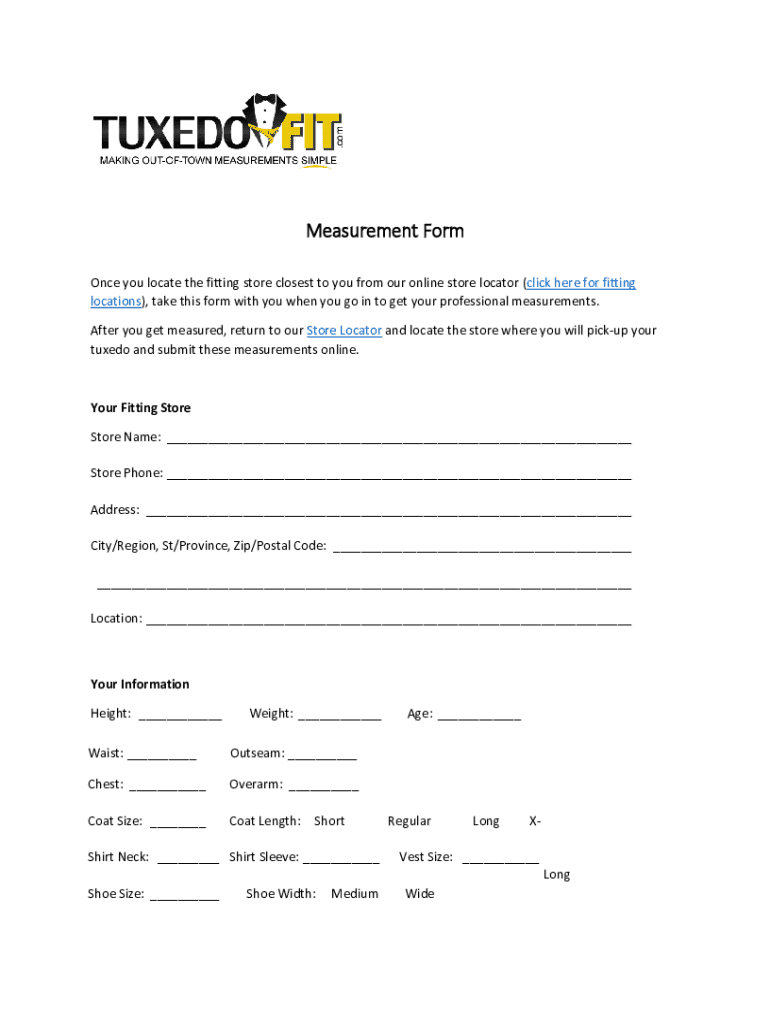
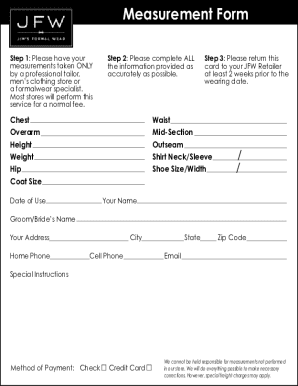
The Measurement Form is a business form used by customers to record body measurements for tuxedo customization at fitting stores.
pdfFiller scores top ratings on review platforms




I am not the most computer literate person, and PDF filler has been great for me. Very user friendly.
I like this program and would be interested in learning how to fully utilize it.
Who needs Tuxedo Form?
Explore how professionals across industries use pdfFiller.

Tuxedo Form is needed by:
-
Individuals getting fitted for a tuxedo.
-
Tailors and fitting store employees.
-
Brides and grooms planning for weddings.
-
Event planners coordinating formal events.
-
Cosplay participants needing custom attire.
Comprehensive Guide to Tuxedo Form
What is the Measurement Form?
The Measurement Form serves to assist customers in accurately recording their body measurements, which is vital in the bespoke tuxedo customization process. This form's significance lies in ensuring that every detail, from height to waist, is taken into account to guarantee a proper fit for the tuxedos. Precision in measurements directly impacts the overall look and comfort for the wearer, making this form an essential tool in any fitting store's arsenal.
Purpose and Benefits of the Measurement Form
The Measurement Form is designed to fulfill practical needs for both customers and fitting stores. For customers, it streamlines the tuxedo measurement process, allowing for easy online submissions that save time and reduce errors. Fitting stores benefit from the organization and clarity that come with utilizing a structured body measurement template, leading to improved customer satisfaction and expedited service.
Key Features of the Measurement Form
The Measurement Form includes several fillable fields essential for proper customization:
-
Height
-
Weight
-
Waist size
-
Chest size
-
Shoe size
Additionally, the form features sections for store information and provides clear instructions to enhance user-friendliness.
Who Needs the Measurement Form?
The Measurement Form is essential for individuals needing tuxedos for significant life events such as weddings, proms, or formal parties. Both customers and store owners can leverage this form to ensure comprehensive and accurate tuxedo fittings, ultimately leading to a better experience for all parties involved.
How to Fill Out the Measurement Form Online (Step-by-Step)
Filling out the Measurement Form online is straightforward. Follow these steps:
-
Access the Measurement Form on the pdfFiller platform.
-
Input your height into the designated field.
-
Enter your weight accurately.
-
Provide measurements for waist, chest, and shoe size.
-
Double-check all entries for accuracy before submission.
To ensure the most accurate measurements, remember to discuss any common mistakes with your fitting store representative.
Review and Validation Checklist for the Measurement Form
Before submitting the Measurement Form, use this checklist to ensure accuracy:
-
Verify all measurements against a reliable measuring tool.
-
Ensure that the correct store information is included.
-
Look for any missing fields that need to be filled in.
-
Correct spelling errors in names or addresses.
This review process helps avoid common errors that might result in an inadequate fitting.
How to Submit the Measurement Form
Submitting the Measurement Form can be done through various methods. Online submission via pdfFiller allows users to fill and send their forms directly from their browser. Stores may also have additional processing guidelines to follow, so it’s essential to confirm these details during the submission process.
Security and Compliance for the Measurement Form
Maintaining data security is crucial when handling customer measurements. pdfFiller ensures that all forms filled through its platform are safeguarded with robust security measures, including encryption and compliance with regulations like HIPAA and GDPR. This commitment to privacy and data protection fosters trust among users, ensuring their sensitive information remains secure.
How pdfFiller Can Help You with the Measurement Form
pdfFiller simplifies the form-filling experience by providing intuitive online tools that support users throughout the process. From editing to eSigning, the platform enhances usability while ensuring that users can efficiently complete their Measurement Forms without unnecessary hassle.
Your Next Steps for Completing the Measurement Form
By utilizing pdfFiller for your Measurement Form, you gain access to several advantages. Key features of the platform facilitate an efficient and user-friendly experience, accelerating the process of filling out important measurements. Begin your form-filling journey with pdfFiller today to save time and enhance your tuxedo fitting experience.
How to fill out the Tuxedo Form
-
1.To access the Measurement Form, visit pdfFiller and log into your account. Use the search bar to find the 'Measurement Form' and click on it to open.
-
2.Once the form is open, familiarize yourself with pdfFiller's interface. You can navigate through the form using your mouse or keyboard.
-
3.Gather all necessary information before starting. This includes your height, weight, waist, chest, shoe size, and the store’s details.
-
4.Begin filling in your personal information in the designated fields. Use the text boxes to enter your measurements clearly, ensuring each entry is accurate.
-
5.After completing your measurements, review the form for any missed fields or errors. Make sure all details are correct to avoid complications later.
-
6.Once satisfied with your entries, you can save your progress. Use the ‘Save’ option to store your form for future access.
-
7.To finalize the form, select ‘Submit’. You can download a copy for your records by clicking on the ‘Download’ button before submitting.
-
8.If necessary, you can also share the form directly from pdfFiller with your fitting store using their email integration options.

Who can fill out the Measurement Form?
The Measurement Form can be filled out by anyone needing a custom tuxedo fit, including individuals attending events such as weddings or proms, as well as professional tailors.
Are there any deadlines for submitting the Measurement Form?
While specific deadlines can vary by store, it is advisable to submit your Measurement Form at least two weeks before any planned event to ensure timely processing.
How can I submit my completed Measurement Form?
You can submit your completed Measurement Form through pdfFiller by selecting the ‘Submit’ option. Alternatively, you can download it and email it directly to your fitting store.
What supporting documents are needed with the Measurement Form?
Typically, you do not need any supporting documents with the Measurement Form. However, it is good practice to bring identification or any previous fitting information to your fitting appointment.
What common mistakes should I avoid while filling out the form?
Ensure that all measurements are recorded accurately and completely. Avoid leaving any fields blank as this can delay the fitting process.
How long does it take to process the Measurement Form?
Processing times can vary, but once submitted, allow approximately 3-5 business days for the fitting store to review your measurements and contact you for the next steps.
Can I edit the Measurement Form after submitting?
Once submitted, you may need to contact the fitting store directly to request changes. Make sure all measurements are accurate before finalizing.
Related Forms





Get the latest insights from our blog


If you believe that this page should be taken down, please follow our DMCA take down process
here
.
This form may include fields for payment information. Data entered in these fields is not covered by PCI DSS compliance.